Good photos of yourself.
No photographer needed.

Prop up your phone, step into the silhouette on screen and hold the pose. The photo takes itself.

  • Free
  • No ads
  • No account
Email me at launch

Coming soon to iPhone and Android. One email on launch day, nothing else.

Sound familiar?

Almost everyone says at least one of these.

  • “I don’t have good pictures of myself.”
  • “I’m not photogenic.”
  • “I don’t know how to pose.”
  • “No one takes pictures of me.”

Being photogenic isn’t a talent. It’s a good angle, a relaxed pose and enough tries. The app takes care of all three.

How it works

Four steps. No helper, no self-timer sprint.

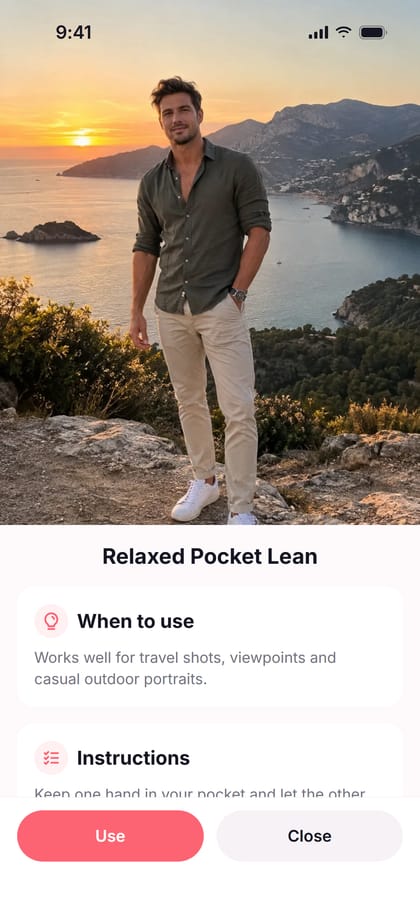
  1. Pick a pose

    Every pose comes with a reference photo, when to use it and four short instructions.

  2. Illustration: a man crouches to prop his phone against a stone on a tree stump, with a lake behind him. Illustration

    Aim your phone

    Put your phone on a stand, a tree or a tripod and frame the background you like.

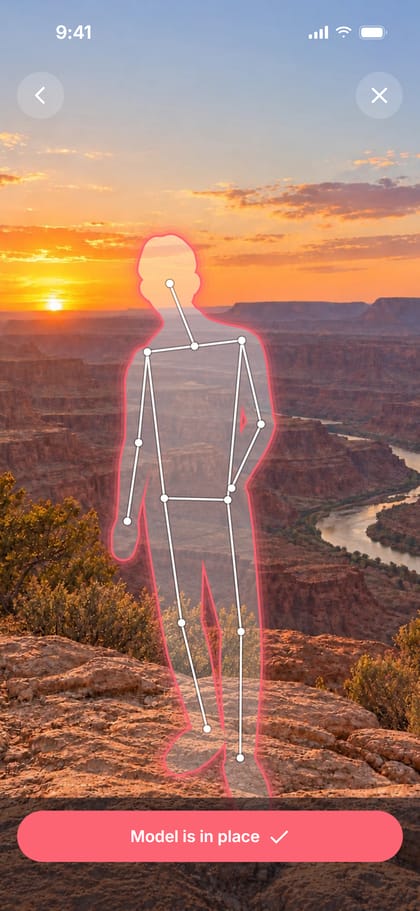
  3. Place your silhouette

    Drag the silhouette to where you want to stand. Pinch to make it bigger or smaller.

  4. Illustration: the same man stands relaxed a few steps from his phone, which is propped on the stump and taking his photo. Illustration

    Take your photo

    Step into the silhouette and match the pose. Hold it for about a second and the photo takes itself. Stay in the pose and it keeps shooting.

One hint at a time

Like someone behind the camera saying “a bit to the left”.

  1. It tells you where to stand.

    “Step a little to the left.” “Come a little closer.” Always in your own left and right.

  2. Then it fixes the details.

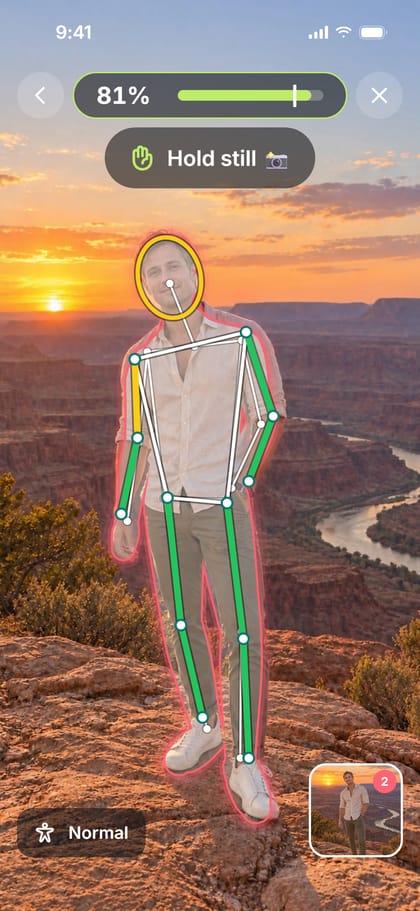
    The part of you that is still off lights up, and one short hint says what to do about it.

  3. When it looks right, hold still.

    The bar fills, the photo takes itself, and you never have to run back to your phone.

Ready to use

From the shot to your profile without another app.

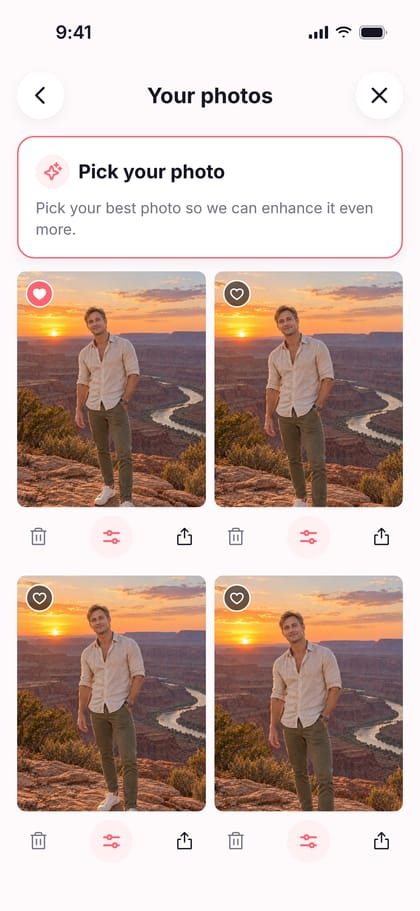
  • Pick your best

    Every photo from a shoot is kept together. Mark your favourites and come back to them later.

  • Fine-tune

    One tap on Auto, or adjust exposure, contrast, highlights, shadows, saturation, vibrance, warmth and vignette yourself. It changes light and colour. It never changes you.

  • Frame it for where it’s going

    Portrait for Instagram, Facebook and Tinder. Square for LinkedIn. Position yourself once to fit every frame, then save to your phone.

Background blur is available on iPhones with a depth camera.

Illustration: a portrait with two crop frames drawn over it, a tall one for Instagram, Facebook and Tinder and a square one for LinkedIn. Illustration
  • Instagram
  • Facebook
  • Tinder
  • LinkedIn

Poses that look natural

Relaxed, not stiff. Three to start with, more on the way.

  • Illustration: a man stands on a cliff path at sunset, one hand in his pocket, weight on one leg.

    Relaxed Pocket Lean

    Works well for travel shots, viewpoints and casual outdoor portraits.

  • Illustration: a man leans against a stone wall above the sea, arms crossed loosely, one leg in front of the other.

    Crossed Arms Lean

    Works well for scenic travel shots, viewpoints and relaxed lifestyle photos.

  • Illustration: a man sits at a desk, chin resting on one hand, the other forearm across the table.

    The Thoughtful Lean

    Fits well for work, lifestyle and relaxed indoor portraits.

  • More coming

    New poses arrive with updates. They will be free too.

The reference photos in the app are illustrations.

Free, private and real

Five promises, and how you can check each one.

  • Free.

    No ads, no subscriptions, no in-app purchases. Every feature is there for everyone.

    How you can check

    On the store page, look for the line “In-App Purchases”. There won’t be one.

  • No account.

    No sign-up, no email address, no login. You open it and it works.

    How you can check

    The first screen is the app, not a form.

  • Nothing uploaded.

    We never upload your photos. We couldn’t if we wanted to: there is no server.

    How you can check

    Switch on flight mode and use the whole app. One note: your phone’s own backup and gallery sync follow your settings. That is between you and your phone.

  • No AI edits.

    Your photos are never generated and never altered by AI. Fine-tuning changes light and colour, and on iPhones with a depth camera it can blur the background. It never changes you.

    So how does it see my pose?

    A small model on your phone finds points on your body: head, shoulders, elbows, knees. It reads the picture; it never changes it, and it doesn’t know who you are.

  • Only what it needs.

    The camera, and permission to add a photo to your gallery when you tap “Save to phone”. No microphone, no location, no contacts.

    How you can check

    The app asks for the camera when you start your first shoot, and for adding photos the first time you save one. It never asks for anything else.

  • So what’s the catch?

    There isn’t one. Pocket Cameraman is a hobby project by one developer. Everything runs on your phone, so there are no servers to pay for and no reason to sell ads or data.

    And this website? No cookies, no analytics, nothing loaded from other companies.

Small things, big difference

Two of the tips that come with the app.

  • Illustration: a man photographed from far too low, so his legs look huge and his head small.
    Not like this
    Illustration: the same man photographed from chest height, in natural proportions.
    Like this

    Use the right angle

    Put your phone at the right height, in a holder if you have one. Too high or too low and your photos look odd.

  • Illustration: a man at a desk in a loud patterned vest over a bright polo shirt.
    Not like this
    Illustration: the same man at the same desk in a plain dark shirt.
    Like this

    Wear good clothes

    Good clothes make you look much better. Dress up as the best version of you.

Good questions

Short answers, no small print.

When can I get it?

Soon, on iPhone and Android. Send us an email and we will tell you once, on launch day.

Is it really free?

Yes. No ads, no subscription, no paid extras. It is a hobby project and it costs next to nothing to run, because everything happens on your phone.

Does it use AI?

Not on your photos. A small model on your phone sees your pose so the app can guide you. Nothing is generated and nothing is retouched.

Do I need a tripod?

No. A stand, a shelf, a tree or a stone works. A phone holder makes it easier to get the height right.

Does it work without internet?

Yes. Taking, fine-tuning and saving photos all work with flight mode on.

Which languages does it speak?

English, Dutch, German, French and Spanish.

Are the photos on this page real?

No. They are AI-generated illustrations, the same ones the app uses to show each pose. They will make way for photos taken with the app.

Get the app

Pocket Cameraman

Better photos, a more confident you